Install Free Movies App on Android TV & Firestick
Want to enjoy movies and TV shows on your TV screen? 🍿 You can easily install the Movies App (APK) on Android TV or Firestick by following the steps below.
🔹 Step 1: Get the Downloader App
- Open Play Store (Android TV) or Amazon App Store (Firestick)
- Search for Downloader
- Install it on your device
🔹 Step 2: Launch Downloader
- Open the app from your apps section
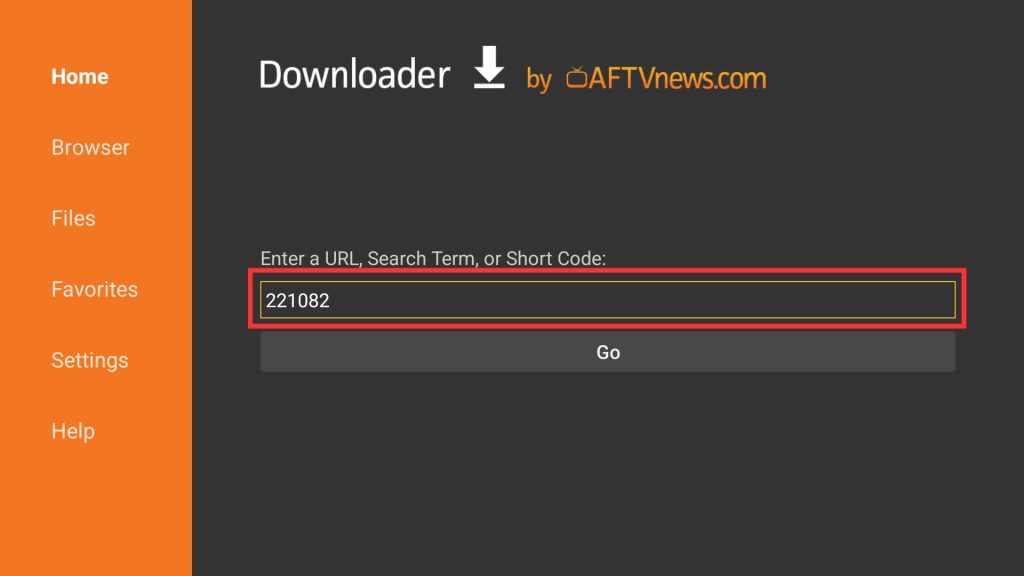
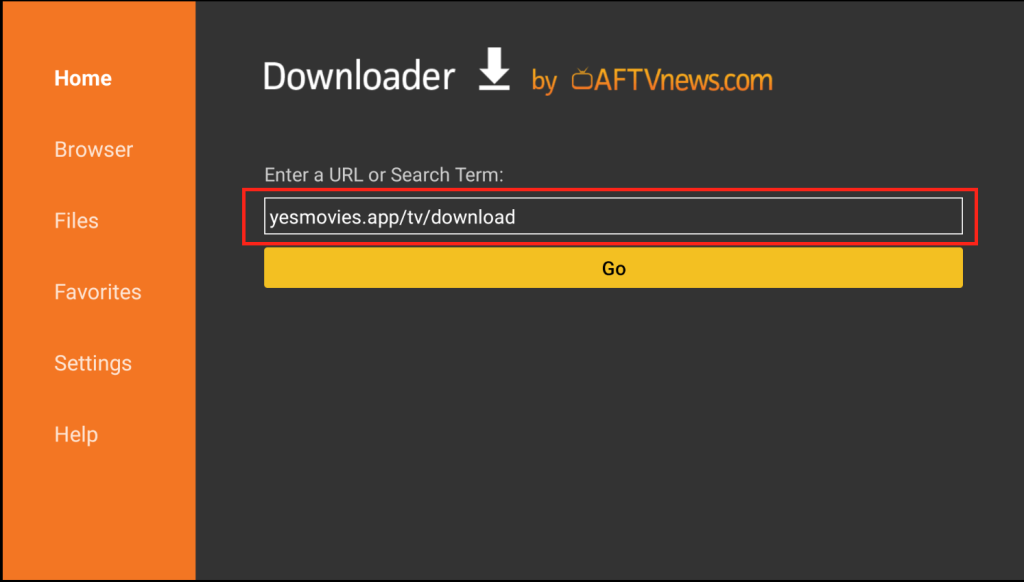
🔹 Step 3: Add Download Code or Link
Use one of the options below:
OR
- Enter code: 221082
- Or type: yesmovies.app/tv/download
🔹 Step 4: Install the App
- Click Go to start downloading
- When download finishes, tap Install
✅ That’s it! The Movies App is now ready on your TV.
💡 If installation is blocked, enable Install Unknown Apps from your settings.
🔐 Login to Movies App on TV Using OTP (Mobile → TV)
Signing in on your TV is quick and easy. Just follow these simple steps to connect your mobile with your TV app.
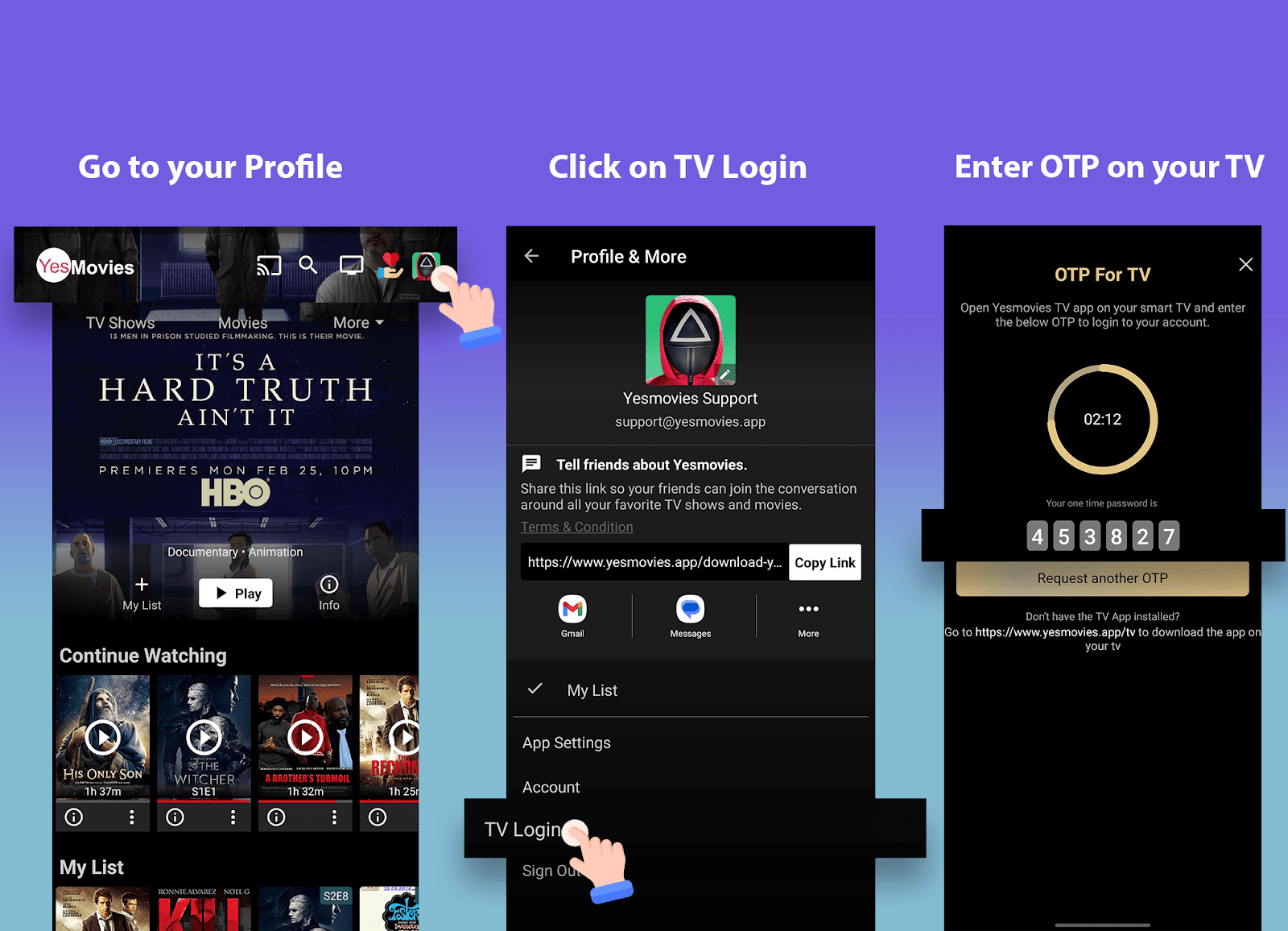
- 📱 Open the Movies App on your mobile phone
- 👤 Go to the Profile section and select TV Login
- 🔢 A one-time code (OTP) will be shown on your mobile screen
- 📺 Enter this code on your TV screen to connect both devices
✨ Once the code is verified, your TV will be logged in automatically.
📸 For better understanding, step-by-step images are provided below.
💬 If you face any issue during login, make sure both devices are connected to the same internet network or try again after restarting the app.
📺 Complete Guide to Install Movies APK on TV
This guide explains how to install a free movies streaming app on Android TV and Firestick. You can choose an easy method using Downloader or install it manually.
⭐ Requirements Before Installation
- Stable internet connection
- Allow installation from unknown sources
- Downloader app installed
🔥 Method 1: Using Downloader (Easy Way)
Step 1 — Install Downloader
- Android TV: Open Play Store → Search Downloader → Install
- Firestick: Open Amazon Store → Search Downloader → Install
Step 2 — Open the App
Launch Downloader from your apps list.
Step 3 — Enter Code or URL
- Code: 221082
- Or URL: yesmovies.app/tv/download
Step 4 — Install APK File
- Press Go
- Wait for file download
- Tap Install
- Open the app
🎉 Now you can stream movies on your TV without any hassle.
🛠️ Method 2: Install APK Manually
If Downloader is not working, you can install the APK manually:
- Download the Movies APK on your phone or PC
- Transfer it to TV using:
- USB drive
- File sharing apps
- File manager
- Open the file and install it
⚙️ Enable Unknown Sources
Android TV
Go to Settings → Apps → Special Access → Install Unknown Apps → Enable
Firestick
Go to Settings → My Fire TV → Developer Options → Install Unknown Apps → Turn ON
🎬 Why Use This Movies App?
- Watch movies and shows for free
- Smooth and fast playback
- Optimized for TV screens
- Works on Android TV, Firestick, and TV boxes
❓ Frequently Asked Questions
Is this app available on official
stores?
No, you need to install it manually using APK.
Will it work on my TV?
Yes, it supports most Android-based TVs and Fire
devices.
Is it safe to use?
Always download from a trusted source.
How can I update the app?
Visit the download page and install the latest version.
Facing download issues?
Possible reasons:
- Slow or no internet
- Wrong link or code
- VPN enabled
- Network restrictions